

Blog Editor Guide
1. Purpose
The goal is to publish useful, SEO-friendly, engaging blog posts on seaan.shop across three main content niches:
- Money & Side Hustles
- Lifestyle
- Shopping & Products
Follow the steps below for every article.
2. Choose a Topic
Choose a topic from the lists below.
Money & Side Hustles
- 12 Side Hustles You Can Start With Almost No Money
- I Tried 5 Online Income Ideas—What Actually Requires Work?
- How to Turn One Skill Into Multiple Sources of Income
- 7 Money Habits That Can Make Your Monthly Budget Easier
- The No-Fluff Beginner’s Guide to Making Money Online
Lifestyle
- 30 Tiny Habits That Can Make Your Days Feel More Organized
- I Tried a “No-Scroll Morning” for 14 Days
- 50 Things to Stop Buying If You Want to Save More Money
- The Ultimate Weekend Reset Checklist
- 10 Simple Ways to Make Your Home Feel More Expensive
Shopping & Products
- 25 Surprisingly Useful Products You Didn’t Know You Needed
- Things Under ₹1,000 That Can Actually Improve Your Daily Life
- 10 Viral Products: Which Ones Are Actually Worth Buying?
- The Ultimate Gift Guide for People Who Say They Want Nothing
- 15 Small Gadgets That Solve Annoying Everyday Problems
3. Generate More Topics
You don’t have to use only the topics listed above.
You can ask ChatGPT to generate additional topics related to each niche.
Money & Side Hustles Topic Prompt
Generate 20 viral, SEO-friendly blog topic ideas about money, side hustles, saving, freelancing, and online income. Focus on practical, beginner-friendly, curiosity-driven topics with strong click potential.
Lifestyle Topic Prompt
Generate 20 viral, SEO-friendly lifestyle blog topic ideas covering productivity, habits, self-improvement, wellness, home, and everyday life. Focus on practical, relatable, curiosity-driven topics with strong click potential.
Shopping & Products Topic Prompt
Generate 20 viral, SEO-friendly shopping and product blog topic ideas featuring useful products, buying guides, comparisons, trends, gadgets, and gift ideas. Focus on practical topics with strong search and click potential.
4. Save the Topic
Once you select a topic, save it for future use.
Keep a simple topic list or spreadsheet or note list containing:
- Topic title
- Niche
- Status (To do / Published)
This prevents the same topic from being accidentally used twice.
5. Generate the Blog Post
After selecting a topic, copy the appropriate prompt below into ChatGPT.
General Blog Writing Prompt
Use this for Money & Side Hustles and Lifestyle topics:
Write a WordPress-ready, SEO-friendly blog post titled “<PASTE THE TOPIC TITLE HERE>”. Create an engaging introduction, useful and well-structured sections, H2/H3 headings, short paragraphs, bullet points where helpful, a short FAQ, and a conclusion. Use a natural, conversational tone and avoid keyword stuffing, exaggerated claims, and unsupported information. Make the article practical, original, easy to read, and useful to the target audience. Also provide an SEO meta title, meta description, URL slug, and focus keywords. Format the article in clean HTML suitable for the WordPress editor.
Shopping & Products Blog Writing Prompt
Use this for Shopping & Products topics:
Write a WordPress-ready, SEO-friendly blog post titled “<PASTE THE TOPIC TITLE HERE>”. Include an engaging introduction, exactly 15 relevant product sections, useful product descriptions, key features, who each product is suitable for, practical buying tips, H2/H3 headings, bullet points, a short FAQ, and a conclusion. Use a natural, conversational tone and avoid keyword stuffing or unsupported claims. Do not invent product specifications, prices, ratings, or availability. Also provide an SEO meta title, meta description, URL slug, and focus keywords. Format the output in clean HTML suitable for the WordPress editor.
6. Example
For example, if the selected topic is:
15 Amazon Finds You’ll Wish You Discovered Sooner
Use:
Write a WordPress-ready, SEO-friendly blog post titled “15 Amazon Finds You’ll Wish You Discovered Sooner”. Include an engaging introduction, exactly 15 relevant product sections, useful product descriptions, key features, who each product is suitable for, practical buying tips, H2/H3 headings, bullet points, a short FAQ, and a conclusion. Use a natural, conversational tone and avoid keyword stuffing or unsupported claims. Do not invent product specifications, prices, ratings, or availability. Also provide an SEO meta title, meta description, URL slug, and focus keywords. Format the output in clean HTML suitable for the WordPress editor. Note: Do not include price or rating it must be compitiable with amzon affilate program
7. Important Content Rules
Before publishing, check the following:
Accuracy & Note
- Do not mention prices, discounts, ratings, reviews, or availability in post.
- Verify claims about money-making methods before publishing.
- Avoid guarantees such as “make ₹50,000 every month” unless properly supported.
- Avoid presenting personal experiences as real if they did not actually happen.
SEO (Optional)
Every article should have:
- One clear H1 title
- Relevant H2/H3 headings
- Natural keyword usage
- SEO meta title
- SEO meta description
- URL slug
- Focus keywords
- Useful internal links where appropriate
Do not stuff keywords into every paragraph.
Readability
- Keep paragraphs short.
- Use headings to break up the article.
- Use bullet points when they improve readability.
- Explain complicated ideas simply.
- Write for humans first, search engines second.
8. Review the AI Output (Optional)
Do not copy the AI-generated article directly to WordPress without checking it.
Review:
- Title
- Introduction
- Facts and claims
- Product information
- Formatting
- SEO information
- Links
- Images
- Affiliate links, if applicable
Remove anything that is inaccurate, unnecessary, repetitive, or unsupported.
9. Add Images / Featured Image
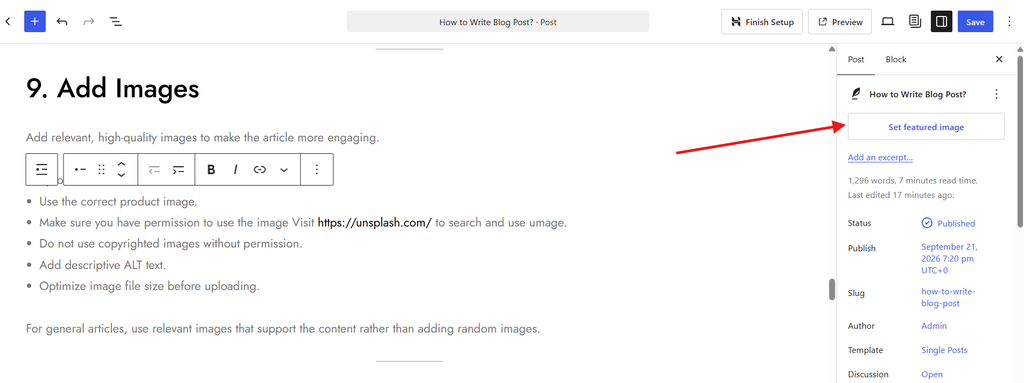
Add relevant, high-quality images to make the article more engaging as featured image.
For product articles:
- Use the correct product image, upload image related to post title or content.
- Make sure you have permission to use the image Visit https://unsplash.com/ to search and use image.
- Add descriptive ALT text (Optional).
10. Add Affiliate Links Where Applicable (By Admin)
For shopping/product articles, add affiliate links only where appropriate.
Before adding an affiliate link:
- Check that the link works.
- Check the current product information.
- Clearly disclose affiliate relationships where required.
Do not turn the article into a list of affiliate links. The content should remain useful even without clicking a product link.
11. Add Internal Links (Optional)
Where relevant, link to other useful articles on seaan.shop.
For example:
A shopping article about desk gadgets could link to another article about work-from-home products.
Internal links should be natural and genuinely useful to the reader.
12. WordPress Publishing
After reviewing and editing the article:
- Open WordPress.
- Create a new post.
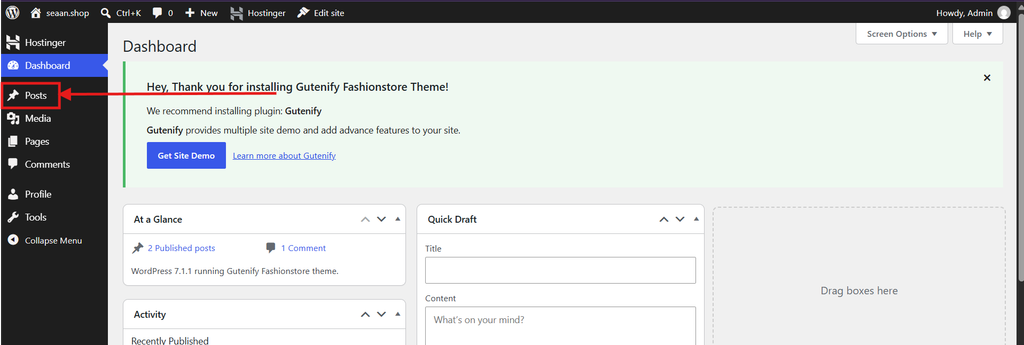
- Give the post the correct title.
- Switch to the Code Editor by clicking the three dots (⋮) in the WordPress editor.
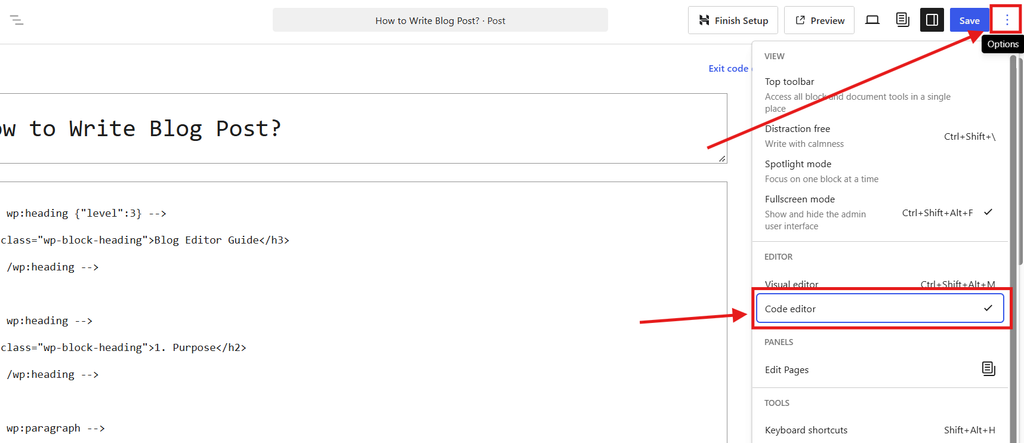
- Select Code Editor.
- Copy the HTML generated by ChatGPT.
- Paste the HTML into the Code Editor.
- Switch back to the Visual Editor.
- Check the formatting.
- Add the featured image.
- Add categories and tags.
- Add the SEO title, meta description, and focus keyword using the site’s SEO plugin (Optional).
- Add internal/external links where appropriate (Optional).
- Preview the article.
- Check the article on desktop and mobile (Optional).
- Publish when everything is ready.
13. Final Publishing Checklist (Optional)
Before clicking Publish, confirm:
- Correct topic selected
- Article matches the selected niche
- Title is correct
- Introduction is engaging
- H1/H2/H3 structure is correct
- Content is useful and original
- No unsupported claims
- Product information has been verified
- No spelling or grammar issues
- Images added
- Image ALT text added
- Internal links added
- External links checked
- Affiliate links checked, if applicable
- SEO title added
- Meta description added
- URL slug checked
- Focus keywords added
- Featured image added
- Mobile preview checked
- Final article proofread
14. Content Goal
The goal is not simply to publish a large number of articles.
Every article should be:
Useful + Original + Easy to Read + SEO-Friendly + Accurate
Focus on helping the reader first. Search traffic and clicks should come from genuinely useful content rather than misleading headlines or unsupported claims.
Quick Workflow
Choose Topic → Save Topic → Generate Article → Review Facts → Edit → Add Images → Add Links → SEO Check → WordPress → Preview → Publish
Leave a Reply